Suggestions and improvements for Chinesepod in 2015
Matt_T
January 07, 2015 at 04:49 PM posted in General DiscussionHello Fellow Poddies,
There has been a lot of discussions over the last few weeks about all the changes happening with Chinesepod. Many people have posted suggestions and improvements that they would like to see in the future, however they are scattered across chats in multiple lessons and other discussions.
I am creating this post to provide a spot in which we can unify our posts on potential improvements that we would like to see Chinesepod work on in 2015 and have a discussion with the Chinesepod team on what may be possible and what isn't.
We should also be aware that some changes can take some time and a lot of work to implement so we shouldn't expect everything to be implemented immediately, but perhaps this could be an area where we also track what has been implemented and what may still be pending.
Happy New Year and Happy Posting! I'm looking forward to hearing all your great ideas!

Attenuendo
August 26, 2015 at 05:06 AM
I'm a bit late to the party, but here are my suggestions if they are still being accepted:
For how I use ChinesePod, there are 4 types of lesson I would like to keep track of:
- Lessons I don't plan on studying any time soon.
- Lessons I would like to study in the near future.
- Lessons I am in the process of studying (usually takes a good 2-4 days for me and I often have a few going in parallel)
- Lessons I have finished studying.
Type 1 is easy - unbookmarked, unstudied
For type 2, I've been using the bookmark feature
For type 4, I've been used the mark studied feature.
I'm not aware of a feature that would allow me to mark type 3 lessons. If there is, I'd like to know. If there isn't, maybe that could be added?
I also echo previous commenters suggestion about having some male native speakers... I'm male myself and I would like to understand more how tones sound from a lower-pitch voice. Obviously not something that can be changed overnight, but maybe something to keep in mind.
Finally, I worked my way through the pinyin series (it has been a great help to me pronunciation!!), but the Pinyin chart itself that was mentioned in every lesson was no where to be found. It is kind of there in the various lessons, but I think it would be great to follow along with them all in one place.
linnie-lin87
August 03, 2015 at 04:47 PM
Perhaps a little late to the discussion, but I recently re-joined, and I have two comments on the current CPod:
1. Not enough material for advanced students; and
2. Can we please get Detective Li back? I really loved the Chinese murder mystery hear plays!
Other than that congratulations on joining Fiona - I really enjoy your Qing Wen videos, even as an advanced student these are sometimes useful!

ZhouRui
July 25, 2015 at 10:25 AM
I would like to see media lessons again that are based on current events. All the cultural topics are ok, but they are not useful enough to spend more than five minutes on. I find them to be made up of a bunch of specialised vocab mixed in with elementary-intermediate sentences. I take little to nothing away from them. Also, lessons based on conversational dialogue, like the advanced lessons, are just too easy. They won't prepare students for what advanced Chinese is in the classroom and on standardised tests -- that is, long articles and complex sentences. Conversational Chinese ends at the intermediate level...
If CPod doesn't intend to serve advanced students like it once did with media lessons, it should be made clear. My current subscription was based on the assumption of having new media lessons, but after I subbed, I realised there weren't any. I tried to get my money back but I couldn't even after three emails explaining my situation. That was unfortunate. I wish I knew before hand that there weren't any more article-based lesson. I'm making the best of my sub, but it really hasn't given me anything that I don't already own through past subscriptions. Even the discussion forums are practically dead...
agiegerich
July 23, 2015 at 02:03 AM
One thing that I would find very useful would be to make the different "sides" of the flashcards more versatile. For example I would like to have My Language on one side and Pinyin + Audio on the other side or even Pinyin + Audio + Hanzi on the other side. This is currently not possible.

bababardwan
March 19, 2015 at 12:13 AM
I hope I'm not doubling up on a suggestion, but on a quick scroll through I can't see this mentioned. I'd like a feature restored that has been lost. Previously when playing a line in the dialogue tab you could click on the play button again and it would go back to the start of the sentence. This is useful for long sentences if you miss a bit and want to go back to the start without having to wait for the rest of the dialogue to play out. I realise there is a workaround now...that you can download each line of the dialogue and then you could control that in your playback. But this would be less efficient for me. I only occasionally want to start the line over again. Any chance of bringing it back? Was there a reason this feature was removed in the first place. It's great when we have new helpful features but not so great when old useful features are removed.

Gwilym-ChinesePod
March 19, 2015 at 06:46 AM
I'll see what we can do about this suggestion. I think it would be useful for the longer sections of dialouge.
bababardwan
March 19, 2015 at 12:18 AM
ps of course if we then wanted to improve on the old feature, it would be to have each line of dialogue in the dialoge tab play out with a progress bar along the bottom [ like in windows media player for example] so you could then take the dialogue from wherever you wanted to by clicking at the appropriate spot on the progress bar. This would become very useful for long stretches of dialogue [particularly at the upper levels ] towards the end of a very long dialogue line if you miss something without having to go right back to the start of the line just to have a second go at catching that end bit. I hope I've explained that clearly enough.

david_d
March 14, 2015 at 02:40 AM
Just came on here to say - so far so good by my standards.
Also, having a balance of male and female native speakers would be a major plus. I remember, as a beginner, I would be caught saying things in a very effeminate way, and I blush a bit when I think back at it. :) 真讨厌啊!

Matt_T
March 14, 2015 at 07:33 AM
Hey David,
I also noticed that my voice is higher when I speak Mandarin vs speaking English. Perhaps its due to my sources for listening practice being primarily from female speakers while learning tones. Its pretty funny.
jameslester
March 13, 2015 at 02:01 AM
Dear Chinese Pod and users,
I have some concerns with chinese pod's diversity. It seems since Jenny and David have left you cant hear any fresh mainland mothertongue putonghua. I like fiona, her english and chinese are both amazing. This might be the problem. From my selfish point of view Chinese pod is for listening practice. Therefore having something explained to me in chinese is higher value than a crisp english explanation. (This still applies to low level courses.) if i still misunderstand I can look to textbooks/google etc, but in honestly the chinese explanation is more effective in terms of starting to use the lanaguage straight away.
As a customer I obviously want the standard quality chinese, or at least a wide variety. I love Taiwan and all its charm, but It is not known for its quality, standard putonghua. To that end, Cpod needs to think about getting some charismatic mainland speakers (to which there are many!) By all means keep Fiona. An improvement in diversity is key. Many of us will likely head to Beijing / Shanghai before Taipei. Chinese pod will lose customers if it becomes taiwanese pod. Maybe I am in the minority and I guess some users cannot differentiate between the Taiwanese accent and a mainland one.
Would love to hear if anymore has similar worries etc. By all means fire me down if you think im wrong.
Best wishes
James
ZhouRui
July 25, 2015 at 10:13 AM
Some of the tones showing up in lessons are the Taiwanese standard and not the mainland standard.

anonymous892191
March 14, 2015 at 12:45 AM
I guess i can relate, James!
I'm an advanced learner of chinese, and although Fiona is charming and very talented person, i can definitely feel it: it's not that standard Mandarin, that i used to hear from Jenny Zhu & Co
(and i hope i won't be banned for that, but i guess that the vocabulary of Constance for instance in advanced lessons ist much richer, and the word usage is .. i don't know ... more natural, my friends from beijing have confirmed it).
I don't say it's wrong, and i love the taiwanese flavor, and i also would like to have that language diversity, BUT: you definitely need more hosts from Mainland China, including MALE native speakers.
Matt_T
March 13, 2015 at 05:07 AM
Hey Jameslester,
What level lessons are you referring to when you mentioned things being explained in English vs Mandarin? From my point of view I don't feel that the format has changed since Fiona, Gwilym and Constance joined.
Newbie and Elementary always had lots of clear english and explanations but when you move into Intermediate one host speaks english and the other mandarin. Moving inter upper intermediate or above it's usually all in Mandarin.
With regards to the lessons I feel that the pronounciation is quite clear and pretty standard, especially Constance. I have friends from both mainland China and Taiwan and agree there is a clear difference in the pronounciation between the two. I , however, do not notice any Tawiwan pronounciation within the CPod lessons. Perhaps my ear just isn't finely tuned enough to pick up the subtle hints of Taiwan accent in the lessons but this is my view.

Kerstin80
February 04, 2015 at 10:15 AM
Hi guys, concerning the discussions, I would suggest to put the most recent threats to the top. This way one could avoid scrolling down the whole way and would quickly be able to assess the latest inputs. Best, Kerstin
Gwilym-ChinesePod
March 03, 2015 at 01:09 AM
There's now a link to click to view the most recent comment :)

newtonvsleibnitz
February 04, 2015 at 07:34 PM
It must be a massive job ... its taken a month already!

podster
February 04, 2015 at 05:00 PM
The webmaster is (supposedly) working on figuring out how to restore the previous functionality whereby when you clicked the link it automatically scrolled to the most recent comment.

psamet
January 31, 2015 at 08:52 PM
I have 2 additional thoughts regarding this question:
1) The courses are showing their age. It would be nice to get some of the more recent shows and hosts into them.
2) It seems like you guys are sitting on a mountain of underutilized data. You've already linked each show to a list of associated vocabulary and subject tags. And you know which shows we've studied (based on the "mark studied" button). By extension, you have a rough idea of which vocabulary and subjects we're familiar with. Why not spit that information back at us? It would be nice to know where our strengths and weaknesses lie, how much new vocabulary any given show might present to us, and when's a good time to advance to the next level (based on vocab rather than on # of shows).

jamesspence
January 27, 2015 at 05:51 PM
I had the same thoughts as I start to transition to Intermediate. I do listen to Newbie lessons once and awhile and the newer ones seem extremely not newbie. Also the newer Elementary lessons are much more advanced than they should be. However with that said it must be hard to come up with new ideas for entry level lesson. John Pasden, a 100% true educator was involved for so many years and made so much good content. That is a hard act to follow and even harder to improve upon. Although I think the new host are hip and cool they may not be at the same level of education understanding as past hosts like John, especially for newer learners. But with al of this said there is still a ton of great content on the site at the newbie and elementary level. Focus on this... as you improve and move towards more advanced levels then try newer lessons. Also let give the new team sometime to react to all our comments. I'm sure there is some settling in that still needs to happen.
oneday7a
January 27, 2015 at 02:59 PM
I only just started learning chinese, so I still usw newbie lessons. They have in my opinion gone way down in quality compared to earlier. All the last lessons are oddly specific, topicwise. The expansion sentences are completely overblown, both gramatically and vocabularywise, for a newbie lesson. In the latest "sleep in" about half the words are introduced with their pinyin and ztheir tones, the other half is not. It seems lackluster to ask "what does wo3 mean" and not do the same for yao4. Plus none of them get repeated anymore. Listen to the John pasden newbie lessons for reference, they are just great.
Also it seems like there isn't a teaching goal. In the end, after the lesson is wrapped up, Greg asks "so what's the word for alarm". This is the kind of unstructured "one word here, one word there" learning that I didn't encounter in CP previously.
An actual newbie, someone who uses this as their first podcast, will walk away from this with almost nothing at all. Probabaly not even wo3.
dorothycowling
January 14, 2015 at 05:06 PM
I suggest having the lesson title as well as the number on all contact points e.g. on the downloaded files and on the library information about each lesson.
I find that I download the mp3 files and then don't know the title of the lesson that I have downloaded. I them check in the library and have to actually open up the lesson to find the title. I have now taken to changing the title when I download mp3 files and PDFs, but it would be more convenient not to have to do so.
jiabi
January 13, 2015 at 04:09 PM
you could try http://www.slow-chinese.com/
http://china.org.cn/learning_chinese/index.htm
http://readchinese.nflc.org
http://justlearnchinese.com/mini-novels/

alex184
January 14, 2015 at 02:16 PM
wow that's great, will take a look at these soon. thanks for the info!
alex184
January 13, 2015 at 10:59 AM
Hi everyone,
Im fairly new to Chinese Pod and currently studying the intermediate level. My listening and speaking are more advanced than my reading and it is reading I would like more help with as I think the podcasts are great for listening practice.
What I would like would be more reading practice, such as small paragraphs of text to review/challenge. For example using the vocabulary from the elementary lessons to create stories or texts so I can continue to review/practice the characters. Otherwise I just review the lessons I already studied so I am not sure if I actually would recognise the character if it wasn't for the fact I have learnt the sentence and know it is coming!
I mainly use text books and pleco for reading practice, anyone have any useful methods/websites/books etc?

snoopdogg
February 02, 2015 at 09:59 PM
The "Chinese Stories" or "中文故事" app on iTunes is a good one too. Beginner (red), Intermediate (blue), Advanced (coming soon according to website)...can choose Traditional or Simplified...new stories each month...there's audio, vocab lookup, and short quiz for each story...a bit pricey ($8-12), but they offer some stories to try out for free...worth trying.
Mandarin Companion is good too.
alex184
January 14, 2015 at 02:12 PM
thanks, this is the sort of thing I've been looking for. I bought one graded reader book in the past (different company) but it has all the pinyin above each character so its hard to read as my eyes kept wondering to the pinyin. Think I will give The Secret Garden a go!
Matt_T
January 13, 2015 at 04:12 PM
Hi Alex,
One tool that I started using recently to help with my character reading is the Zhongwen Chinese Pop-up Dictionary extension for Chrome.
https://chrome.google.com/webstore/detail/zhongwen-a-chinese-englis/kkmlkkjojmombglmlpbpapmhcaljjkde?hl=en
I would also recommend the Mandarin Companion graded reader books that offer interesting and popular books re-written to use only a limited number of characters to fit within a certain level.
John Pasden who used to be with Chinesepod is also part of this project so it has some credibility behind them as well. I have been reading a Sherlock holmes story and it's been pretty fun so far.
http://mandarincompanion.com/
psamet
January 11, 2015 at 08:24 PM
Hi everyone,
I'm new to this site and starting to get the lay of the land. In a recent vid, Fiona and Gwilym recommended learning measure words at the same time one learns the corresponding noun. It would be nice to have that option built into the vocabularly manager.
Also, does anyone know if it's possible to import vocabularly into Memrise? I looked, and that doesn't seem to be the case. This might push me into the direction of Anki.

veronique21
January 12, 2015 at 12:07 PM
I agree, it would be cool. Not always easy to know which measure word must be used.
britain21
January 12, 2015 at 11:25 AM
I also agree that there should be more information tied to each individual piece of vocab. Next to each word there should be something saying if the word is a verb/ noun/ adjective/ adverb/ measure word etc. Also for nouns it would be really useful if the measure word was included!!
Matt_T
January 11, 2015 at 11:17 PM
Great suggestion Psamet, I would also like to see more content regarding measure words as this is something I need to work on learning. There was a great video on the Chinesepodtv youtube page about basic measure words but there hasn't been anything else since regarding more advanced ones.

mark
January 11, 2015 at 04:58 PM
It would be nice to get some periodic pointers to what is happening in Chinese music. I like listening to Chinese songs but in recent years they've gotten a bit harder to search out. The local bookstore that used to sell CDs closed, Chinese web sites have put restrictions on downloads to US based IPs. Youtube gives kind of a skewed view and is easiest to search, if you already know who to search for.
mark
January 27, 2015 at 06:25 AM
Pandora and Spotify are pretty terrible in regard to the depth and breadth of their Chinese music collections. They also don't seem to be able to make good recommendations among the Chinese songs that they do have. After I tried those two, I stopped experimenting with US based streaming music services, as a waste of time.
Matt_T
January 11, 2015 at 05:10 PM
Hi Mark,
Have you tried music streaming services? You could try Google Music, Rdio, Pandora. I have the Google Music subscription and they have some popular Chinese artists that you can stream. If you are concerned with streaming the music services such as Google Music actually let you download the songs to listen to offline.
bodul
January 11, 2015 at 07:24 AM
Agree
Size of the jump is substantial.
Other Comment
The Hanz Font in a Dictionary is to small.
When teaching you can not give same "real Estate" to Chinese Characters and Latin Letters.
This is a common mistake accross the board of Chinese Instructions.
Why?
The Teachers know the characters and have conceptual problem being i "student's shoes.
:))
Zic
greglow
January 11, 2015 at 03:16 AM
I'm also stuck somewhere between elementary and intermediate so agree with previous comments about the size of the jump. Also it would be useful for me to have separate feeds for each level rather than the current mixture.

chris
March 16, 2015 at 03:50 AM
In my experience (and i appreciate this is a very subjective thing), the only successful way I found to bridge the Ele to Inter jump was to write out full trascripts of each Inter lesson. Can be quite painstaking at first - particularly with having to rewind little segments repeatedly. But I found it amazing how quickly my listening comprehension improved once I started doing this.
greglow
January 11, 2015 at 03:14 AM
Not sure why but I keep finding the lesson reviews in my RSS feed appearing before the relevant lessons. That makes it really hard to work with when driving long distances and just wanting to listen to a bunch of shows.
markedman
January 10, 2015 at 06:07 AM
I would really like to use the vocabulary flash cards more often but I find there are several crucial things missing:
1) Generally, it is difficult and clunky to work with large decks and add new words to them. There are many reasons for this and if someone at ChinesePod is going to tackle this I would be happy to go into it in detail. Or you could just search for my previous comments and see what I've suggested before.
2) I often want to review vocabularly while walking/washing dishes/driving etc. All of these need handsfree operation. I would like to put it in auto review but the one mode you can't select for that is to automatically say either the chinese word or english translation. It would be great if you could work through a deck and have it give either one first, pause for x seconds and then give the other.
3) It would be great if there were a pre generated deck for every lessons. Not just the vocabularly words, but every word that shows up when you click "Break Down" for all the individual phrases

Kerstin80
January 08, 2015 at 10:32 PM
Hello everybody, I am relatively new to ChinesePod and wanted to take the placement test to start with. Unfortunately, I could not find any button to submit my results from part 1/3 or even continue the test. I might have missed it but in my search for a quick answer I could not find any kind of frequently asked questions page either. This might be worth an update but for the moment I would be grateful if someone could help me figuring this the test? Thanks a lot in advance, Kerstin
Gwilym-ChinesePod
March 17, 2015 at 02:29 AM
We've added the abitily for users to change their own username now by going to "My Account" (Top Right). It's likely that we already have serveral users with that same name, so you'll need to choose something a little more unique.
Kerstin80
February 05, 2015 at 10:07 AM
Thank you for your reply Gwilym@ChinesePod. Sorry for the late response on my side, I did not receive a notification about your answer. Is there supposed to be one?
Concerning the placement test, I tried it again the next day and it worked just fine. :) Thank you nevertheless. Also about the numbers behind my username, I would appreciate if you could remove them.
Cheers, Kerstin
Gwilym-ChinesePod
January 09, 2015 at 02:49 AM
Hi kerstin804750082, which browser are you using? I tested it with Chrome and Safari and as you can see from the GIF at the bottom, just click the "Next" button on each page, then click the red submit button to see what level our system placed you at. P.s, would you like your username updated to remove the numbers at then end of your name?
Matt_T
January 08, 2015 at 04:57 PM
I have another suggestion. In the lesson dialogue would it be possible to add the pinyin below the characters? It is like this in the lesson PDF and I find it very useful as I add the pinyin to my flashcards along with the characters.
Currently it only shows the chinese characters and then the link to click the dropdown fo rthe english translation.
dorothycowling
March 16, 2015 at 04:39 PM
I absolutely agree with earls! Thanks, ChinesePod team, for this improvement and I also hope to see the same format on the expansion pages.

earls
March 16, 2015 at 08:45 AM
Gwilym,
I really like the new dialog page. The characters are so easy to read and the page is rendered cleanly with no overlapping HTML elements! (The audio icons never overlap the dialog text.) The show-pinyin option was implemented in an unobtrusive manner.
Could you please use the same table format for the expansion pages?
Thank you!
chris
March 16, 2015 at 03:48 AM
Hi Matt, re your flashcard set-up, I would definitely only have the Character on the "front" of the card, and move the pinyin to the back. I found this was the only way I really started to crack the challenge of learning the characters.

timothygstout
March 14, 2015 at 06:06 PM
Gwilym,
Love the larger font size of the characters on the dialogue page!
Could you please do the same for the expansion and grammar pages??
Thank you!!
Tim
Gwilym-ChinesePod
March 12, 2015 at 09:01 AM
Update:
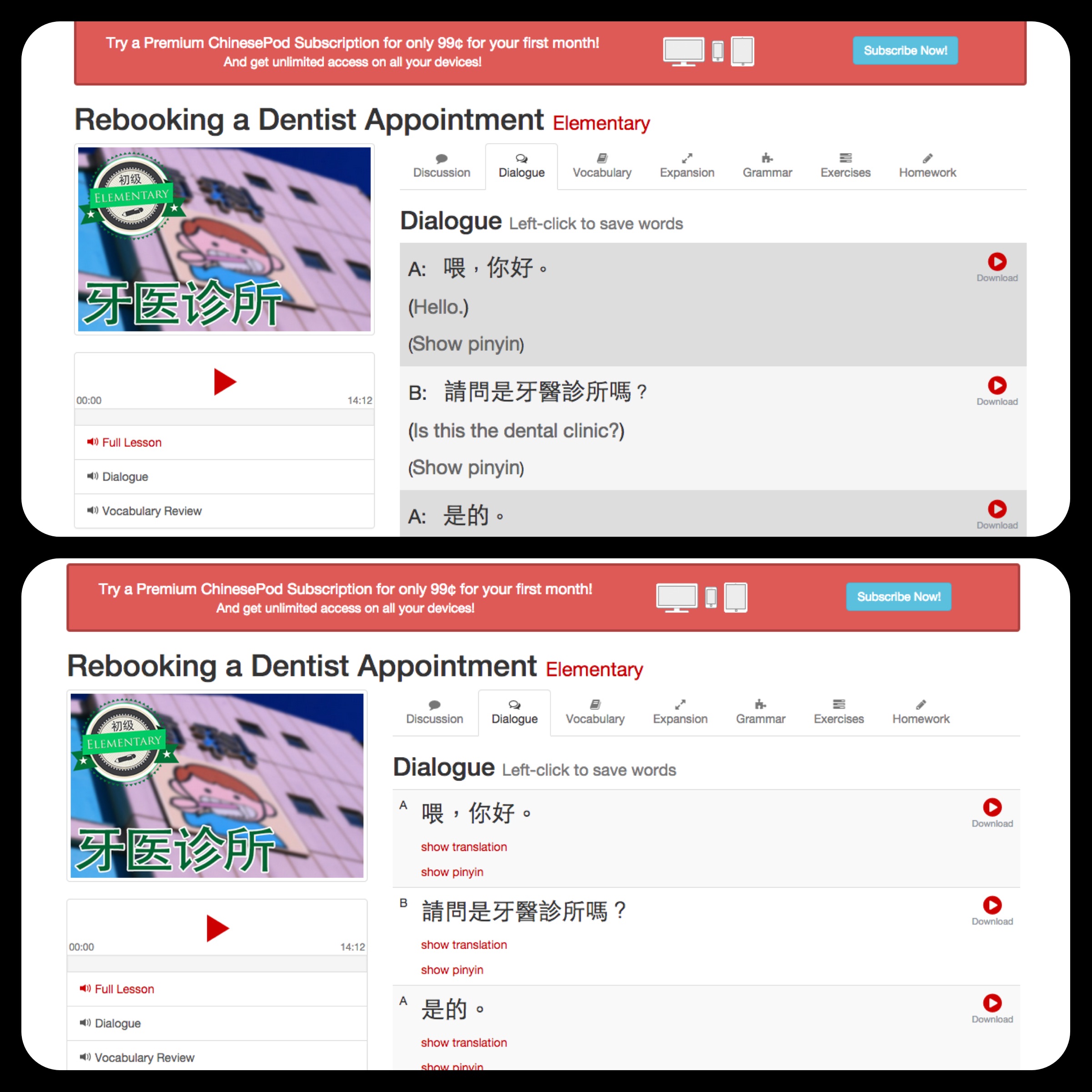
This functionality to view the pinyin alongside the characters and English has been added to the website view.
1.Click to show/hide English and Pinyin
2.Hide/Show English by default avalialbe in lesson settings.
3.English and pinyin text size has been reduced to focus on characters. Also, at higher levels, having English at the same font size as chinese doesnt make sense.
Let us know if you spot any problems/improvements to this.
Matt_T
January 11, 2015 at 04:58 AM
Hey Podster,
I'm currently creating my own flashcards in Anki based on CPod lessons I study and other words I encounter but don't know when I am speaking mandarin with friends.
On the "front" of the card I usually put the characters with the pinyin on the line below. On the "back" of the card I have the definition along with a picture(if applicable) and an example sentence from the CPod lesson written in characters, pinyin and english. Since CPod recently allowed you to download the audio for the sentence that contains the vocabulary word I started adding that as well.
podster
January 10, 2015 at 03:24 AM
Matt, having the characters read to you by the software is a "feature" in my view, and I agree with Olle. Everyone should have weaning themselves off pinyin as soon as possible as a goal. And they should keep that goal in mind when selecting study materials and modes. Unless they are consciously committed to remaining illiterate for some reason. I made the choice long ago to ignore characters and focus on listening and speaking, and I regret it now.
Now you have made an interesting assertion: " ...it really helps with pronunciation as you always see the tones so it helps drill them into your mind." Maybe you can try an experiment using the tone testing function on Skritter. Try studying some of your CPod vocab without pinyin or tone marks, just listening carefully, and then try learning an equal number of words using pinyin. Make separate lists fore each on Skritter and see if viewing the pinyin has really helped you remember the tones better.
What kind of flashcards are you using?
Matt_T
January 09, 2015 at 05:24 AM
Thanks for helping to get the functionality added Gwilym. Regarding Olle's view on avoiding pinyin you're probably right, I find myself often looking at the pinyin first and it's probably a detriment. The one good thing I find with pinyin is that it really helps with pronunciation as you always see the tones so it helps drill them into your mind.
My character recognition is far behind my listen and speaking skills, to the point now that it feels like I'm taking a step backwards learning characters for all these words I have already learned. I do know that it is something that needs to be done, I'm just kicking myself for not starting to learn the characters sooner. It's frustrating to feel so far behind when trying to study the intermediate lessons using only characters as I can't really read anything. :(
Gwilym-ChinesePod
January 09, 2015 at 02:31 AM
I've requested this gets added, and probably get it implemented in a similar way to how the english drops down, but is initially hidden. I think hiding it as default is best otherwise, I, and many others will default to reading the pinyin even subconsciously. I know Olle Linge of Hacking Chinese often would cross-out the pinyin in his textbooks and it's a tip I used when I was at school.

james137
January 08, 2015 at 11:20 AM
can we get a lesson on food, like actual cooking for the advanced users? I'm finding it so strange that I can talk about investing, stocks, economic downturn and marketing, but I cant say "boil" "sautee" "deep fry" "pan" "steam" "spatula" or any actually useful words for the process of cooking.
If you could fill this vocabulary gap it would be great.
As for the accent of mandaring changin to taiwanese, I hardly noticed any difference when i was there so not worried at all.
Matt_T
January 08, 2015 at 03:33 PM
Hey Podster, here is the lesson you are referring to.
http://chinesepod.com/lessons/braised-pork-in-soy-sauce
podster
January 08, 2015 at 02:35 PM
James, have you tried clicking on the magnifying glass icon in the upper right and entering "cooking" in the search box? There is also a video somewhere of Jenny and John cooking a dish.
Matt_T
January 08, 2015 at 01:54 PM
Hi James,
If you are looking for specific vocabulary on items in the kitchen you could try this lesson, I found it useful. It's only intermediate level but has useful vocab.
https://chinesepod.com/lessons/utensils-in-the-new-kitchen
There is also a qing wen on cooking:
http://chinesepod.com/lessons/chinese-gets-cooking

waterbear
January 08, 2015 at 05:11 AM
Make some competition within the community. Fiona has already done this with her tonge twister competition and I think it was a great idea (I was a little late in seeing it to participate) more of these types of things would really help to build discussion in the community.
My ideas for competitons:
a. More tonge twisters obviously.
b. KTV recording competition (I'm already cringing but this would be fun and funny)
c. Create a short story and record it.
d. Do a chain story within one post on the lesson page, everyone would reply to that post with a recording, they would be required to use the vocabulary used in that lesson and eventually expand upon it.
Exmaple
Write “If we have free time, we’ll go to the party” and explain that the students are going to make a story one by one using this pattern. The catch is that every student needs to use the second part of the phrase said by a previous student as the first part of his/hers.
Student 1 If we have free time, we’ll go to the party.Student 2 If we go to the party, we’ll have fun.Student 3 If we have fun, we’ll come home late.Student 4 If we come home late, we’ll miss our test tomorrow. etc.
podster
January 08, 2015 at 03:08 AM
Gwilym, I believe you did promise another user that you would ask the tech team about restoring the feature where the page automatically scrolls to the point in a discussion thread which is indicated by the link when a user clicks on the comment header. Any update on that?
Also there seems to be a loss in the functionality for searching for lessons, as alluded to by others. I think this is a technical problem, but also there seem to be some omissions in lesson tags / related lessons curation. Maybe the library was never properly catalogued or indexed to begin with, and its gotten quite large, so I can understand if it is hard to comb through everything after the fact.
Is there a simple list somewhere of all the lessons, by title and lesson number?
Thanks
Gwilym-ChinesePod
March 03, 2015 at 01:06 AM
The link functionality should now be working. If you click on someones comments on a lesson, the page will auto-scroll down to that comment. There is also a link at the top to the most recent comment on a page (not necessarily the bottom of the page if it's a reply). 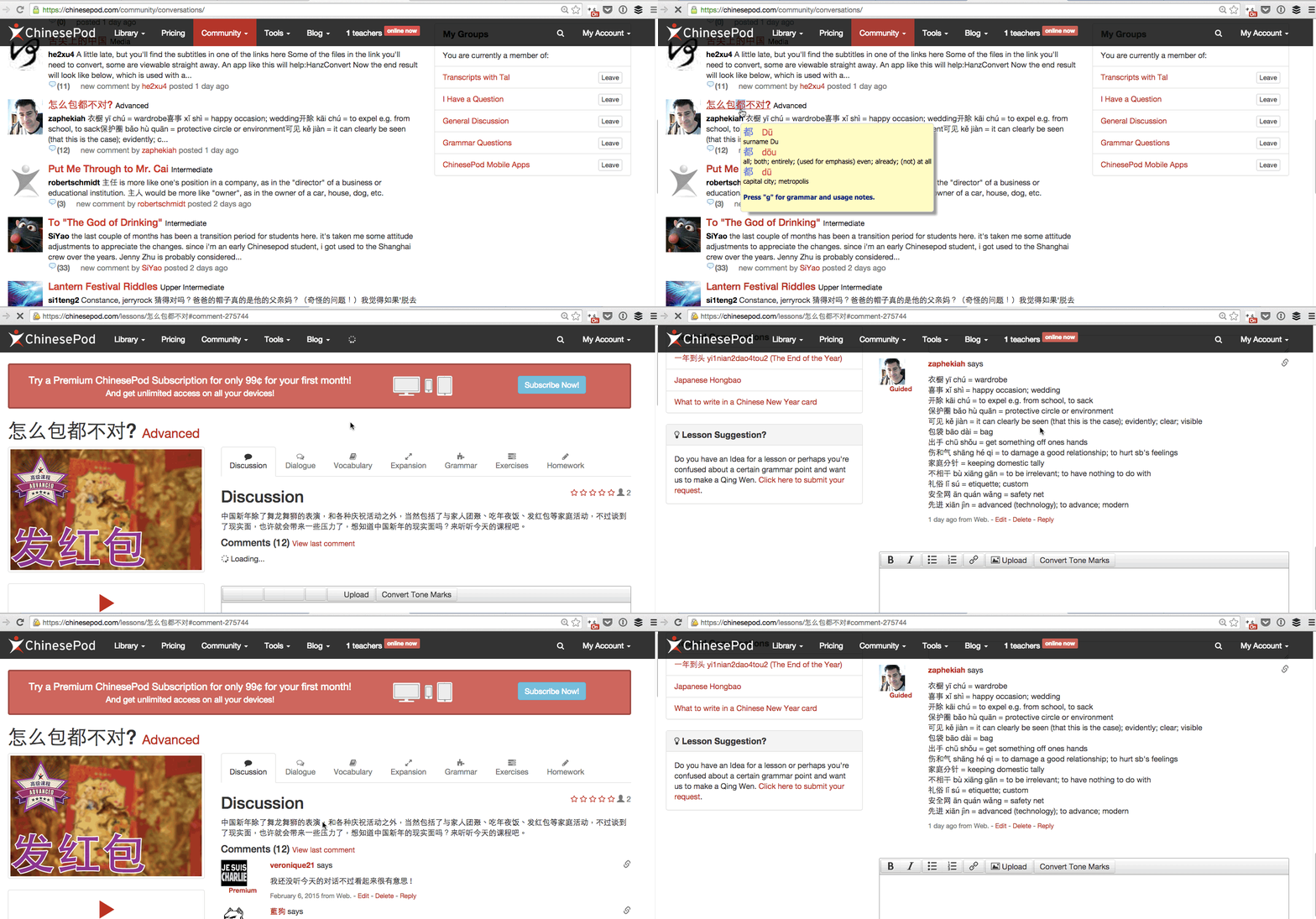
Gwilym-ChinesePod
January 09, 2015 at 02:33 AM
Hi podster, I'm finding out from Armel why the link no longer auto-scrolls to the correct part of the page and will let you know when he gets to it on his todo list.
podster
January 08, 2015 at 02:29 PM
Thanks, Matt. I found that immediately after my post, and it will probably be helpful, but I really wanted the lesson numbers. I have mp3s for many of the lessons without titles and no proper index. I also find iTunes to be a bit clunky.
Matt_T
January 08, 2015 at 04:10 AM
Hey Podster, I'm not sure if this is what you are looking for but try the following.
Click the "Library" link in the navigation bar at the top of the page, then click all and then list at the left of the page it comes to the link below.
http://chinesepod.com/library/list/
This appears to have all the lessons and some filtering options. Lessons are titled and have publication date. There are no lesson numbers listed but the publication date can give you an idea of the order of the lessons.
Matt_T
January 07, 2015 at 11:59 PM
So far I have two suggestions:
1) Make it easier to find some of the available content as it's not listed under the "Library" section and I only stumbled across it but managing my library feed settings from the main page.
http://chinesepod.com/dashboard/feedsettings
Some shows such as the video series, What's the Story, The Menu Stealer and Shanghainese is not listed under lessons or culture shows section of the library.
2) I have already made this suggestion in a previous post but want to add it here as well. With the new video content being created it would be nice to have a video link directly on the lesson page. Currently Gwilym is great and posting a URL that we can copy and paste in another tab but having an intergrated viewer or embedded video would be nice. This already exists for some of the old CPod videos. Ex: http://chinesepod.com/lessons/where-do-you-work

猴子团队
January 07, 2015 at 11:06 PM
Another thougt. It would be really cool if you could save an entire sentence to a deck. So rather than just vocaulary items being stored, being able to save useful sentences, or "staring" them and being able to look them up somewhere on the site.
waterbear
January 08, 2015 at 05:02 AM
I also want this feature, Pleco just added the ability to create flashcards out of example sentences and I've been using it as a substitute for the example sentences on this site which isn't as useful. Being able to add them to the deck for export to Pleco would be a great time saver.

Matt_T
January 07, 2015 at 11:30 PM
FYI, Image link is broken on PC. However when I right click the broken image and copy the link URL it loads the image correctly.
猴子团队
January 07, 2015 at 10:52 PM
Hi guys. What's the new green icon next to the play button on the dialogue section for? I noticed it sometime yesterday?
dorothycowling
January 14, 2015 at 04:52 PM
Does this feature work only on Intermediate lessons?
I cannot find the links on the latest Newbie and Elementary lessons.
waterbear
January 08, 2015 at 05:00 AM
Gwilym, this is an excellent feature and although I don't use Anki (I rely on Pleco for SRS and Skritter) this is still very useful for review.
猴子团队
January 07, 2015 at 11:05 PM
Thanks Gwilym. Yeah, if it could be added to the expansion sentences t0o that would be great since I like to add several of those to my Anki deck to really nail down my understanding of a character in different situations.
Matt_T
January 07, 2015 at 11:01 PM
Wow, this is awesome! I wasn't expecting this feature until later in Q1. Going to be adding these to my Anki cards now, thanks Gwilym.
Gwilym-ChinesePod
January 07, 2015 at 11:00 PM
Hi "Wade" :)
I got this feature added yesterday as a way for users to download the individual voice recordings for each sentence dialogue. Many people like to study on Anki or other apps, so by being able to download an example sentence it might make the cards more useful. It's still being tested, so we are working on improving the look of it, as well as adding the functionality to other parts of the website like "Expansion" "Grammar" and the Dictionary. Let me know how you would like to see it improved.
newtonvsleibnitz
January 07, 2015 at 09:11 PM
Nice idea, but I wouldn't be expecting the current regime to pay this anything more than lip service.
newtonvsleibnitz
January 11, 2015 at 03:50 AM
Actually, numerous poddies in the past have said they don't listen to the full podcast. They just listen to the dialog then use the review tools. In fact I recall one of the CPod team (I think John) recommending to someone to do exactly this (once they had listened to enough podcasts to get a feel for the level they are at). I'm not actually asking for transcripts, just a list of key points. The expansion sentences don't come with explanations, and the grammar notes are not tailored to individual lessons.
猴子团队
January 10, 2015 at 03:52 AM
I like idea 3. I think Qing Wen is a great show and deserves to go up there in the menu bar. If there was a better way to see the qing wens and review older ones, that would be great, such as filtering them by playlists, such as "10 things you ought to know as a newbie learner" '15 questions asked by elementary learners' 等等。
2. With their main product being the 15-20 min podcast, I don't imagine they would then write a transcript of the lesson for those who don't have the time to listen. You can look at the expansion and grammar notes to get an idea of the language focus, or just listen to ChinesePod :)
newtonvsleibnitz
January 09, 2015 at 04:14 AM
OK, since you ask:
(1) Levels between Elementary and Intermediate, and also between Intermediate and Upper Intermediate. So many people complain about the jumps. I think you would hold on to more poddies for longer.
(2) A PDF of NOTES on comments made in the podcasts. It is difficult to find time to listen to the full podcasts even once. I think most people would just listen to the dialogs after listening once to the full podcast, so the extra information is lost.
(3) (only cosmetic I know) In the library, take Qingwen out of 'Culture Shows' and make it a standalone category like all of the levels. It really doesn't belong with 'culture'. Alternatively, make a new category such as 'Supplementary Language Podcasts', and throw Qingwen, The Pinyin Program, Shanghainese, Poems with Pete and Movie Madness in there, leaving the rest under 'Culture Shows'.
(4) Add a 'Latest News' page where you keep us up to date on recent developments and innovations. For example ....... let me see .......... ChinesePod's move to Taiwan :) And the departure of podlebrities.
Talking of which - where has the "team' page gone? I'm pretty sure it was there yesterday. Do you not want us to know the faces of ChinesePod any more?
Gwilym-ChinesePod
January 07, 2015 at 10:31 PM
Hi Newton. What kind of features would you like to see added for 2015? We can only improve if the community has constructive comments.
486799186
September 21, 2015 at 12:08 PMIt's a big ask, but it would be great to have each lesson on memrise.com